
 Calendar Autopilot · Google Sheets™ add‑on
Your spreadsheet runs your calendar.
It tells you if it ever stops.
Each row becomes a Google Calendar™ event. Change the row and the event changes. Delete the row and the event goes. If automatic sync ever stops, you get an email, not a missed appointment.
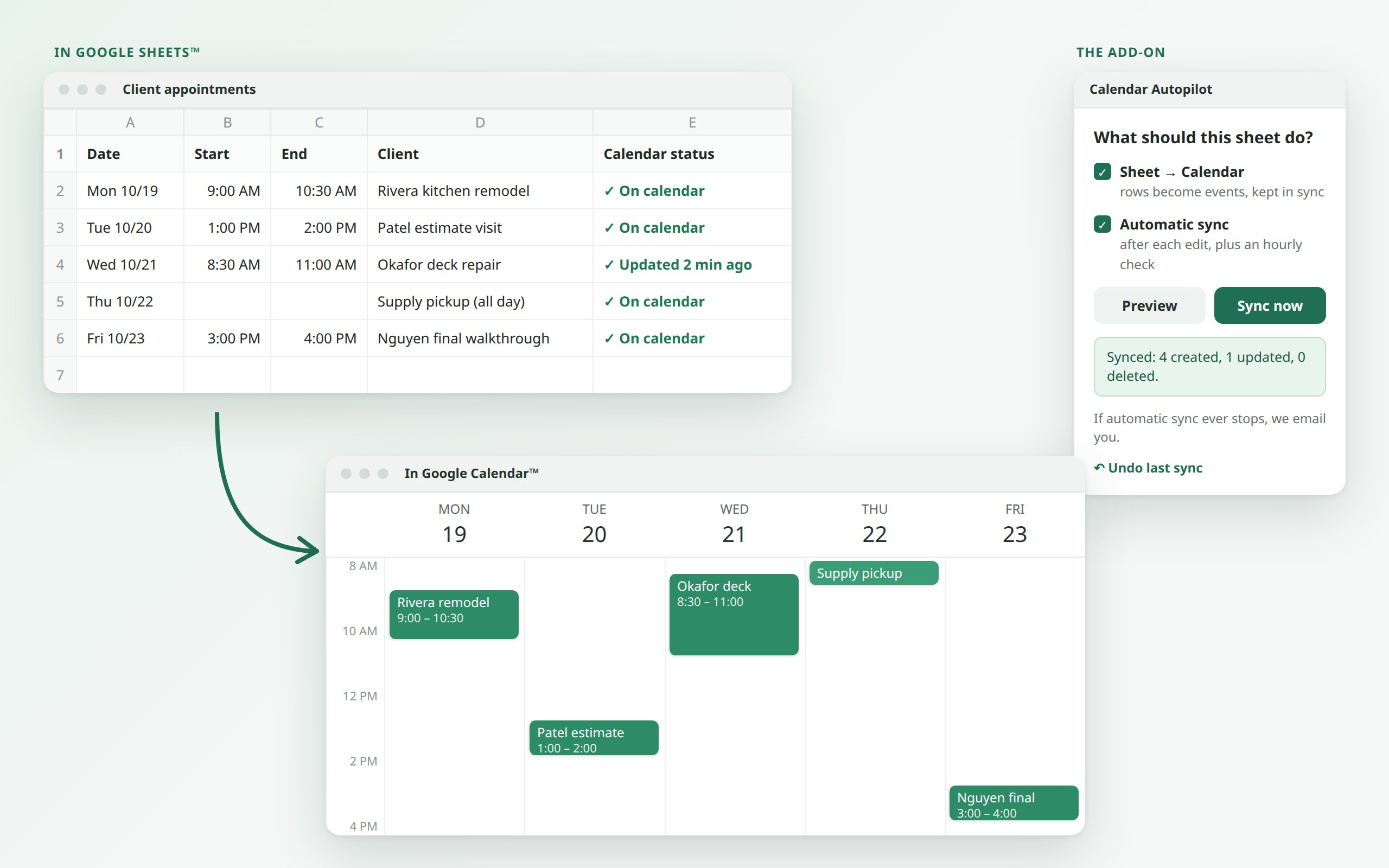
Three steps, about two minutes.
Open your sheet
Any sheet with a date column works. Calendar Autopilot finds your date, time, title, location and guest columns for you, and you can change any guess.
Preview, then sync
See exactly what will happen ("creates 12, updates 3, deletes 1") before anything touches your calendar.
Turn on automatic sync
From then on, edits reach your calendar right away, with an hourly check to catch anything missed, even with the sheet closed.
Built for the ways other sync tools let you down.
A check mark on every row
A status column shows ✓ for each row that's on your calendar, or ⚠ with the reason in plain words when one isn't.
Never fails quietly
Google gives no warning when an add-on's timer stops. We do. If your automatic sync goes quiet, we email you.
Preview and Undo
Look before you sync. Changed your mind? Step back through your last 20 syncs, on the calendar and in the sheet. Anything you've edited by hand since is left alone.
No duplicates, ever
Each row is tied to its own event. Sort the sheet, run it twice, or copy a row, and you still get one event per row.
A safety stop
If a sync would delete a lot of events at once, it stops and asks you first.
No sign-up
Install it and it works. There's no account to create and no card needed for the free level.
Four features. Use one, or all of them.
Sheet → Calendar Ready
Rows become events and stay in sync, including all-day events, times in your sheet's time zone, locations and guests.
Calendar → Sheet Ready
Move, rename or delete an event in Google Calendar™ and its row catches up. Changed in both places? You choose which side wins. Nothing is erased: a row whose event was deleted is kept and marked.
Date reminders Coming soon
"Email me 7 days and 1 day before each date in column C." Works with the sheet closed.
Form → Calendar Coming soon
Each new Google Forms™ answer becomes a calendar event.
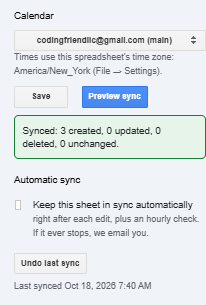
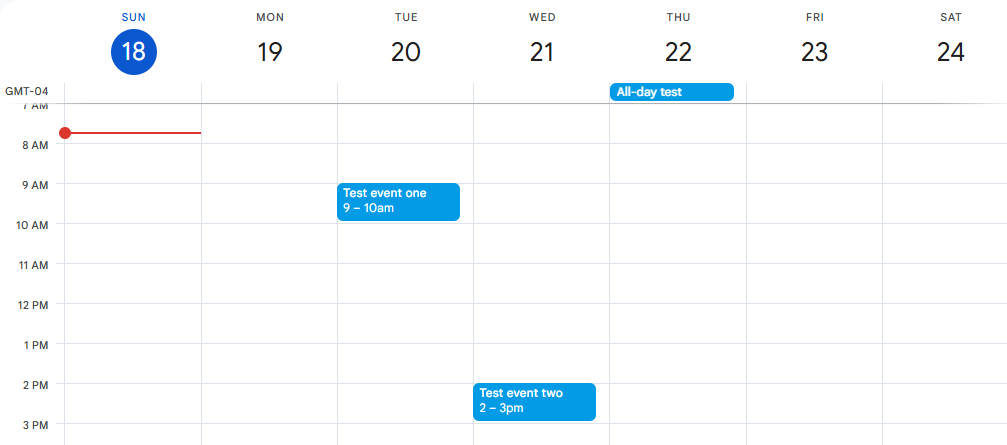
From our live test on October 18.
Not a mock-up: three test rows synced into a real Google Calendar™ on the first try.

We ask for only what it needs. Nothing more.
Google shows you a permission screen when you install. Here is every permission on it, in plain words, and exactly what we use it for. We picked the narrowest version Google offers for each one.
| Permission | What we use it for | Google's name |
|---|---|---|
| See and edit only the spreadsheet you open it in | Reads the columns you choose and writes the status column. It cannot open any of your other spreadsheets or files. | spreadsheets.currentonly |
| Manage events on calendars you own | Creates, updates and removes the events that belong to your rows. Google's permission covers calendars you own; the add-on only ever looks up events carrying its own hidden tag, so your other events are never read or changed. | calendar.events.owned |
| See the list of your calendars | Only to fill the calendar picker with names. This permission cannot read any events. | calendar.calendarlist.readonly |
| Show a sidebar in Google Sheets™ | To display the add-on's panel. | script.container.ui |
| Connect to an outside service | Only to our own license server, to check your plan and send sync health counts. Never the contents of your sheet or calendar. | script.external_request |
| Run when you're not there | Only if you turn on automatic sync: one trigger for edits and one hourly check, for that spreadsheet. | script.scriptapp |
| See your email address | To know which plan is yours, and where to send the alarm if automatic sync stops. | openid · userinfo.email |
What we never ask for
No access to your Gmail™, Google Drive™, contacts, or any spreadsheet other than the one you open. No access to calendars you don't own. No permission to share or delete calendars. If a future feature (like date reminders) ever needs a new permission, we will list it here and Google will ask you before it can be used.
Free to use. Pay only to lift the limits.
Every feature has a free level with no time limit. Paid plans unlock within seconds of paying, and if they don't, you get a full refund.
| # | Feature | Free, forever | Paid |
|---|---|---|---|
| Feature 1 | Sheet → Calendar | Sync by hand on any sheet. Automatic sync on 1 sheet, first 100 rows. | Automatic sync on all your sheets, every row |
| Feature 2 | Calendar → Sheet Works with Feature 1 | Sync by hand in both directions on any sheet. Automatic two-way sync on 1 sheet, first 100 rows. | Automatic two-way sync on all your sheets, every row |
| Feature 3 | Date reminders Soon | 1 rule, 25 emails a month | No set limit (Google's own daily email limits apply) |
| Feature 4 | Form → Calendar Soon | 1 form, 25 events a month | No set limit |
Pick the features you want. You pay by how many you turn on, not which ones:
Cancel any time from the add-on's "Manage billing" button. Not happy? Email us within 14 days of a charge for a refund. Details in our terms.
Your sheets and calendars never touch our server.
The syncing runs inside your own Google account. Our server only knows your email address, which features you've paid for, and whether your automatic syncs are checking in. It never sees what's in your sheets or calendars, and we never sell anything.
Permissions, in plain words · Privacy policy · Terms of service · How we handle data
How it compares, honestly.
What other Google Sheets™ calendar add-ons do well, where Calendar Autopilot fits better, and what their reviewers report. Checked October 25, 2026.
Sheets2GCal · Calendar Events Creator · Sync Sheets to Calendar · Add Reminders
A person answers.
Email support@codingfriendllc.com. Someone who builds the add-on replies within one business day.
Google Sheets™, Google Calendar™, Google Forms™ and Gmail™ are trademarks of Google LLC. Calendar Autopilot is made by Coding Friend LLC and is not affiliated with or endorsed by Google.